FreeCell Solitaire Classic Puzzle
Reviews
Description
Game Introduction
FreeCell Solitaire Windows XP Edition is a faithful recreation of the iconic card puzzle that defined a generation of computer users. Step back in time with the authentic green tableau, familiar card backs, and straightforward layout. This game is more than a simple pastime; it is a test of ability, planning, and strategic foresight. Every game is theoretically winnable, offering a deeply satisfying mental workout. Enjoy unlimited free games directly in your browser, no downloads or installations required. Perfect for all skill levels, from seasoned masters to curious newcomers, this classic edition captures the essence of casual, thoughtful gaming.
How to Play
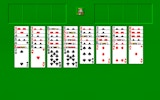
The objective is to build four foundation piles in ascending order from Ace to King, one for each suit. You are dealt all 52 cards face-up into eight columns. Use four free cells as temporary holding spaces for any single card. Move cards in descending order and alternating colors within the tableau columns. The key to victory is careful sequencing and leveraging the free cells to unlock stuck cards. Unlike traditional Solitaire, luck plays a minimal role; your strategy determines success. Drag and drop cards with intuitive controls to solve each unique puzzle.
Game Features
Authentic Windows XP interface. Strategic single-player gameplay. Free and accessible online. Perfect for all ability levels. Brain-training fun.
Tips for Success
Plan several moves ahead to maximize the use of free cells. Prioritize moving cards from the tableau to foundations early to free up columns. Avoid filling free cells unnecessarily, as they are crucial for temporary storage. Practice regularly to improve your ability to spot sequences and anticipate blockages.
🛠️ Compatibility
• OS: Windows 10+, macOS 11+, iOS 14+, Android 10+ • Browsers: Chrome 100+, Safari 15+, Edge 100+, Firefox 100+ • Not compatible with Internet Explorer Tested on real devices – works as expected