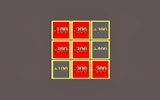
Tile Chaos Puzzle Game

Casual
Developer: Stellar Stream Dev
Published: 2026-04-12
Updated: 2026-06-12

Reviews

Tile Chaos is a straightforward puzzle game that challenges your spatial reasoning. The simple mechanic of destroying cubes to match a moving wall is surprisingly engaging. Difficulty ramps up nicely, keeping you on your toes. It is perfect for quick sessions and offers good replayability as you try to beat your previous scores. A solid choice for puzzle fans.

Description

Game Introduction

Tile Chaos is a puzzle game that tests your ability to think and act quickly. The main objective is to form a shape that can fit inside a moving wall. You start with a grid of cubes. Your task is to destroy the right cubes to create the correct shape. As you progress, the moving wall changes speed and shape requirements become more complex. This game is suitable for players of all ages who enjoy a mental challenge. It offers a clean and simple design that focuses on gameplay. Each level brings a new puzzle, keeping the experience fresh and engaging. Tile Chaos is a great way to practice quick decision-making and spatial awareness.

How to Play

To play Tile Chaos, use your left mouse button to click on cubes and destroy them. Your goal is to leave a shape that matches the outline of the moving wall. Pay attention to the wall's shape and position. Plan which cubes to remove to create the correct form. If you fail to match the shape in time, the game ends. As you advance, the pace increases, requiring faster and more accurate moves. Stay focused and think ahead to succeed. The controls are simple, making it easy to start playing right away. Practice helps you improve your speed and accuracy.

Game Features

Addictive puzzle gameplay with increasing difficulty. Simple mouse controls for easy play. Clean and clear visual design. Suitable for all ages. Helps improve spatial reasoning and reaction time. Endless levels provide continuous challenge. Quick game sessions fit short breaks.

Tips for Success

To succeed in Tile Chaos, focus on the moving wall's shape before removing cubes. Plan your moves ahead to avoid last-minute mistakes. Start by removing cubes that are clearly not part of the target shape. As the speed increases, try to work faster without sacrificing accuracy. Regular practice will improve your reaction time and spatial reasoning. Stay calm and think strategically, even as the pace picks up.

Compatibility:


✅ Works on PC & Mobile | Recommended: Chrome / Safari / Edge
Faq
Is Tile Chaos free to play?
Tile Chaos is typically available as a free online game. Many puzzle games of this type are free to play in a web browser, though some may include optional in-game purchases or ads. Check the specific platform for details.
Can I play Tile Chaos on my mobile device?
Tile Chaos may be playable on mobile devices if it is offered as a mobile-friendly web game or as a downloadable app. Since the controls are simple (clicking or tapping), it is well-suited for touch screens. Check your device's app store or the game's website for availability.
Does Tile Chaos have a time limit?
Yes, Tile Chaos has a time-based challenge. The moving wall progresses at a set speed, and you must complete the shape before it reaches a certain point. As you advance, the speed increases, adding pressure to act quickly and accurately.
Are there different difficulty levels in Tile Chaos?
Tile Chaos features increasing difficulty as you progress through levels. The game starts with simpler shapes and slower wall movement, then gradually introduces more complex shapes and faster speeds. This natural progression provides a continuous challenge without separate difficulty settings.
Can I pause the game in Tile Chaos?
Many online puzzle games like Tile Chaos include a pause feature, but it is not guaranteed. Typically, you can pause by clicking a button or pressing a key (like Escape). If you need a break, look for a pause option in the game interface.
Does Tile Chaos save my progress?
Tile Chaos may save your progress using browser cookies or local storage, allowing you to continue from where you left off. However, this depends on the specific version. Some online games reset progress when you close the browser, so check the game's settings or description for details.
Advertisement